
Today we have released a new feature allowing the export of charts directly to a PDF document, or a PNG image.
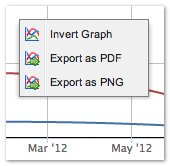 To access this feature, right-click on any chart in STAT and choose either export as PDF, or export as PNG from the drop down menu. A preview dialog will open showing the chart with the same aspect ratio (width vs. height) as the original chart. The preview can be resized to change the shape of the final exported chart. When satisfied with the shape of the chart click on the Export PDF or Export PNG button.
Exporting as PDF
When exporting to PDF the page size can be set to one of three standard paper sizes or sized to fit the preview. Select one of these four paper sizes from the drop down in the preview window.
- Letter (8.5 x 11″)
- Legal (8.5 x 14″)
- A4 (210 x 297mm)
- Preview Sized – the paper size can be set to the same dimensions as the preview window by choosing this item.
For the standard paper sizes the paper orientation can also be set to either Portrait or Landscape orientation using the drop-down menu next to the paper size drop-down.
Exporting as PNG
Two resolutions for the final PNG image are available on export: a very high resolution image which is 4000 pixels wide, or a smaller image at 1000 pixels wide. In both cases the shape of the chart is preserved. The low resolution image is intended for email or web publishing, and the higher resolution image is more suited for printing.
We hope these chart export options are useful. As always contact us if you have any questions or suggestions for improvements.
Thanks,
Saf and the STAT Team